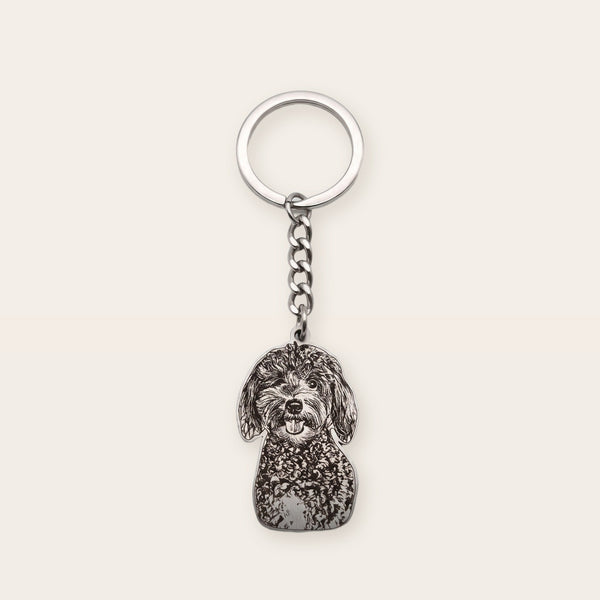
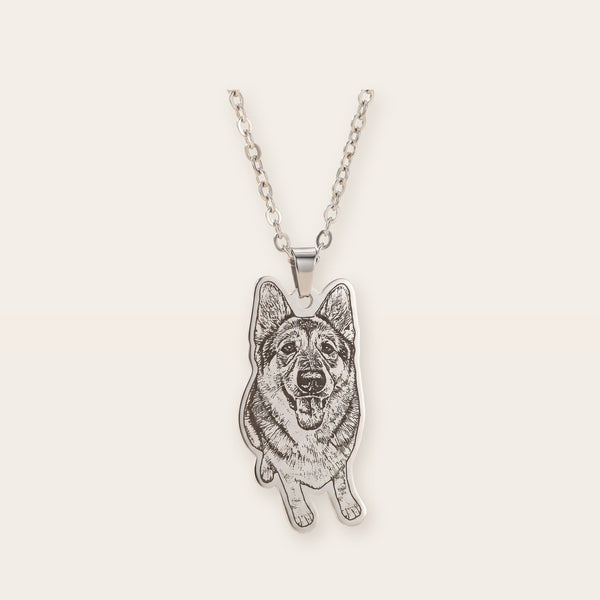
The photo you upload is the drawing the engraver works from. If their eyes are sharp in the picture, they'll be sharp in the metal. If half their face is in shadow, that half comes out flat.
So it's worth knowing how to photograph your pet before you order an engraved pet photo necklace or keychain. You don't need a real camera. Any phone from the last five years is plenty. What matters is light, distance and where they're looking, and you can fix all three in about ten minutes with a treat in your hand.
Why the photo matters so much for engraving
Engraving turns light and shadow into lines in the metal. The contrast in your photo becomes the detail you see: fur texture, the shape of the eyes, the white blaze on a nose. If it isn't visible in the picture, it can't show up on the piece.
Three things decide how it turns out:
- Focus. The face has to be sharp, not soft or blurred by movement.
- Light. Even, natural light shows fur and features. Hard shadows hide them.
- Contrast. You should be able to tell where the pet ends and the background starts.
Get those right and almost any photo engraves well.
How to photograph your pet: 7 rules
1. Use daylight, near a window
Daylight shows the most detail, and it's free. Put your pet near a big window, or take them outside into open shade (bright, but out of direct sun). Midday sun gives hard shadows and blows out light fur.
2. Turn off the flash
Flash flattens the face, makes eyes glow, and wipes out the fine fur texture that makes an engraving look like them. Window light beats it almost every time.
3. Get down to their level
Kneel or lie on the floor so the phone is level with their eyes. Shots from above show the top of the head. Eye level shows the face, and the face is what goes on the piece.
4. Fill the frame with their face
Move closer instead of zooming, since zoom adds blur. A head-and-shoulders shot engraves far better than a full-body one where the face is the size of a thumbnail.
5. Pick a plain background
A wall, the floor, grass, the couch. Plain backgrounds make it easy to separate your pet from what's behind them. A light dog on a dark rug (or a black cat on a pale blanket) engraves especially cleanly.
6. Get them looking at you
Hold a treat or a squeaky toy just above the lens, or say the word that makes their ears go up. You want eyes open and pointed at the camera. Good light helps here too, because it keeps the shutter fast enough to freeze a twitching nose.
7. Take twenty, keep one
Pets don't pose. Take a burst, then zoom in on each one and keep the sharpest. It's easier than waiting for one perfect frame.
Using a photo you already have (including of a pet who's died)
If your pet has passed, you can't take a new one, and you don't need to. Most memorial pieces are made from a photo that's been sitting in a camera roll for years, and a good one makes a lovely pet memorial photo keychain or necklace.
When you scroll back, look for a photo that's:
- Sharp on the face. Zoom in on the eyes to check.
- Well lit, with their features out of shadow.
- Close enough, or croppable to the face without going blurry.
- The original file. A screenshot, or a photo that's been through a few texts and Facebook, loses quality each time. Ask whoever took it to send the original.
It doesn't have to be perfect. A real person checks every photo before we engrave, and if one won't come out well, we'll tell you and help you pick another. If you're also deciding on the words, our list of what to engrave on a pet memorial necklace has ideas.
Photos for an ornament or a bracelet
Two of our pieces want a slightly different photo.
The paw print ornament seals your photo inside a crystal smaller than a pea. Everything gets tiny in there, so pick a picture of one face, close up, in good light. A group shot or a whole dog lying in the grass turns into a speck.
The pet portrait bracelet turns the photo into a fine line drawing. Lines need edges, so a shot where you can see both eyes and the shape of the ears comes out best. Fur color matters less here than it does for a photo engraving; a black dog against a dark couch is fine as long as the outline of the face is clear.
Quick checklist before you order
- Is the face sharp?
- Is it well lit, ideally by daylight?
- Can you see both eyes and their markings?
- Is the background plain and different in tone from your pet?
- Is it the original file, not a screenshot?
Five yeses and you're set. If you're making something in their memory, our dog memorial ideas has a few more ways to use the photo once you've found the right one.
When you've got your shot, you can turn it into a custom circle photo necklace or keychain with their face on it.
Frequently Asked Questions
What kind of photo works best for an engraved pet necklace?
A sharp, close-up photo of your pet's face in daylight, taken at their eye level, without flash, against a plain background. The clearer the eyes, the more it'll look like them.
Can you engrave a slightly blurry or old photo of my pet?
Often, yes, especially for memorial pieces where a new photo isn't possible. What matters is that the face is reasonably in focus. Send the original, highest-resolution version you have, and if it won't work, we'll tell you before we engrave.
Do I need a professional camera?
No. A phone is plenty. Light, focus and framing matter far more than the camera.
What photo works for a photo ornament?
One face, close up, in good light. The photo ends up very small, so group shots and full-body photos lose the detail.